
Artist Operations
The Independent Artist Operating System: A Simple Weekly Workflow for Running Your Music Career
A one-page operating system for independent artists: eight layers, one 30-minute weekly review, and a daily touch that keeps releases, shows, and money moving.

"Get more organized" is too vague to run a music career. A better instruction is: keep the work in a small number of clear places and run the same short routine every week. The system below uses one page, one 30-minute weekly review, and one small daily touch.
Why "more organized" keeps failing
Independent artists often spread career work across notes, chats, calendars, spreadsheets, and memory. Each tool can work on its own, but the hand-offs are easy to lose: a show offer competes with a release deadline, while a session invoice belongs beside the budget it came from. CD Baby's time-management guidance recommends setting realistic goals, breaking projects into smaller tasks, and keeping them in a project tool. Bandzoogle's guide for musicians with day jobs recommends protecting a repeatable block of time when you are most productive. This playbook turns those ideas into a fixed weekly shape.
The one-page operating system
Use eight layers to give the recurring work in an independent music career a clear home.
| Layer | What lives there | The question it answers | Cadence |
|---|---|---|---|
| Dashboard | Today's tasks, deadlines, and priorities | What actually needs me this week? | Daily glance |
| Artists | The project itself — profile, assets, links | Is the core info current? | Monthly |
| Releases | Every release and its dependency chain | What's shipping, and what's blocking it? | Weekly |
| Calendar | Dates from every other layer in one view | When does everything collide? | Weekly |
| Tasks | Owned to-dos with due dates | Who does what by when? | Daily glance |
| Finance | Income and expenses by release, show, source | What is this costing and earning? | Weekly log, monthly close |
| Shows | Every booking from inquiry to completion | What's confirmed, and what's still loose? | Weekly |
| Contacts | Promoters, editors, engineers, and collaborators linked to the work | Who moves this forward, and when did I last follow up? | Weekly |
Download the one-page operating-system diagram as an SVG to pin above your desk or drop into your own workspace.
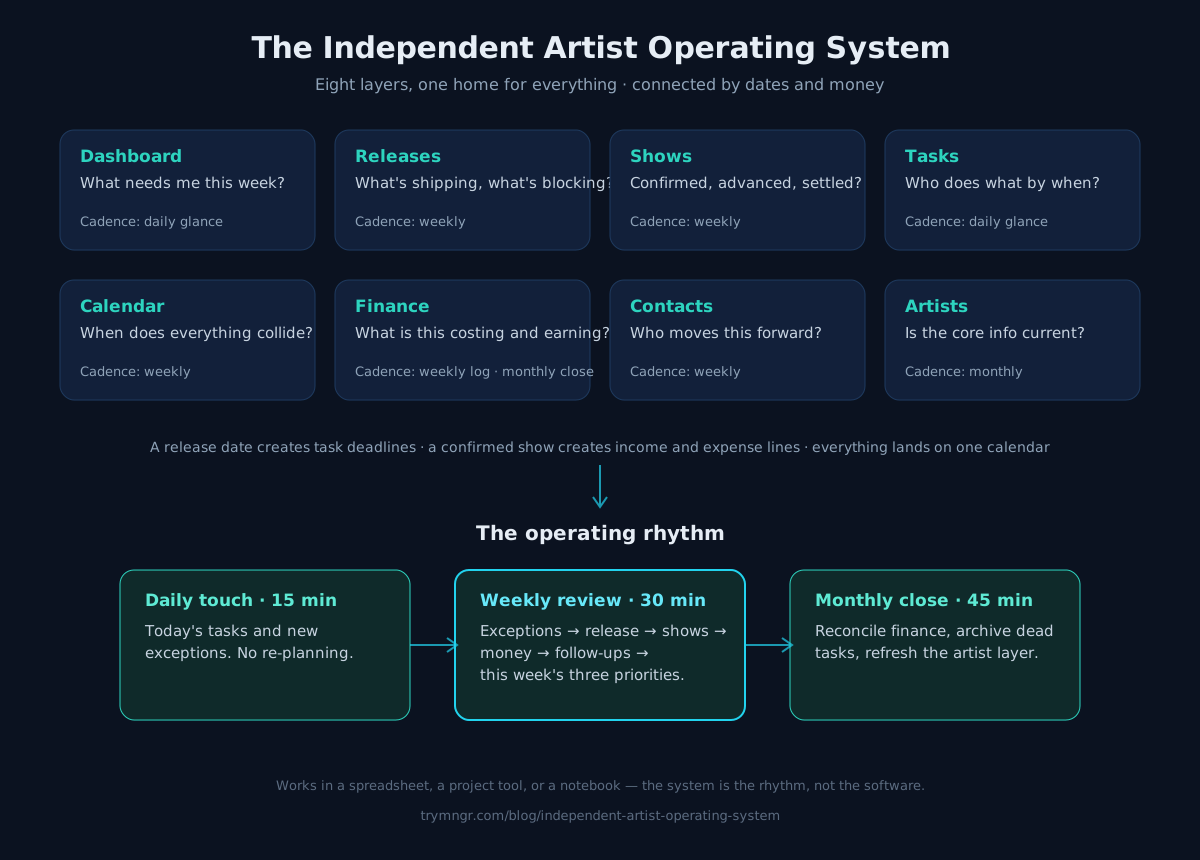
Two rules make the diagram work:
- Everything has one home. A show offer goes in Shows, not the group chat. A mix deadline goes in Tasks with an owner and a date, not in memory.
- Connect the layers through dates and money. Link a release to its tasks and calendar events. Link a show to its tasks, income, and expenses. If a layer never touches the others, you're maintaining a list, not running a system.
The weekly operating review — 30 minutes, same day every week
Pick the same day and hour each week, ideally a time you can protect consistently. Then run this agenda, in order:
- Exceptions first (5 min). Scan for anything late, blocked, or ownerless. Fix owners and dates before adding anything new.
- Next release checkpoint (5 min). What's the next dependency due on the active release? Is it on track? If not, what moves?
- Shows advance (5 min). For each upcoming show: confirmed? advanced? settled? One message sent now beats three apologies later.
- Money log (5 min). Enter the week's income and expenses while the details and supporting records are still easy to find.
- Contacts follow-ups (5 min). Anyone waiting on you? Anyone you're waiting on past a week? Send the nudge.
- Set the week's three (5 min). Choose the three tasks that most move the next release or the next show. Everything else is optional this week.
Thirty minutes is the ceiling, not the target. A quiet week takes ten.
The daily touch — 15 minutes, not a second review
Once a day, glance at the dashboard layer: today's tasks and any new exceptions. Do not re-plan. The daily touch exists to keep the weekly review from leaking into every day.
The monthly close — 45 minutes
Once a month, zoom out: reconcile the finance layer against your bank statement, archive dead tasks, update the artist layer (bios, links, assets), and read the last four weekly "three's." If the same task appeared three weeks running, it's either not real or it's blocked — decide which.
Making it stick
- Anchor it to an existing habit. Same coffee, same playlist, same 30 minutes. The review is a show you don't cancel.
- Run exceptions, not inventories. Focus on what's late, blocked, or new instead of reading every task. A shorter review is easier to sustain.
- Write it down where it lives. If it's not in a layer, it doesn't exist. The group chat is where work goes to hide.
- Start with two layers. If eight feels heavy, start with Releases and Tasks this week and add Finance next week. A partial system you run beats a complete system you don't.
The downloadable diagram works in a spreadsheet, a project tool, or a paper notebook — the system is the rhythm, not the software. MNGR keeps the same operating records in one workspace: tasks and calendar events can link to releases and shows, while income and expenses can be assigned to the work they belong to. That makes the weekly review a pass through connected records instead of a reconstruction from scattered tools.
Sources
Continue the workflow

A Weekly Artist Management Meeting Agenda That Keeps Work Moving
A copyable 30-minute weekly meeting agenda for artist managers, built around decisions, owners, due dates, and exceptions across releases, shows, and finance.
Read article
How Artist Managers Organize Multiple Artists Without Missing Deadlines
A portfolio view, standard stages, one owner and approver per deliverable, and a weekly exception review keep a growing artist roster on schedule.
Read article
Music Release Checklist: From Final Master to 30 Days After Release
A copyable release checklist grouped by time window, with an owner, dependency, status, and evidence field for every task from final master to day 30.
Read article