
Live Operations
How to Manage a Release Campaign and Live Shows in One Calendar
How to keep a music release campaign and live shows on one connected calendar, with a worked twelve-week example and the collisions to design out.

A release campaign and a live schedule are the same operating calendar, not two calendars that happen to overlap. The way to run them together is to put release timeline events, marketing anchors, confirmed shows, rehearsals, travel, and owned task deadlines on one view — grouped by type, filterable by artist, and connected back to the release or show they belong to. That shared view exposes many release-versus-tour collisions before they become last-minute apologies.
Who this is for
This is for artist managers and self-managed artists running a release campaign that overlaps with live work — a single or EP release with a support run around it, a headline show scheduled inside the release window, or a regional date landing during press week. The same shape works for label-run releases, but decision-making at that scale usually sits with the label's product manager and touring team, and you should follow their calendar rather than build a parallel one. Download the connected release-and-show calendar diagram as a working reference and read on for how to use it.
The four streams a release-and-show calendar has to carry
Think of a release-plus-shows window as four event streams landing on one calendar:
- Release timeline events. The dated production and distribution checkpoints: studio done, mix, master, distribution upload, release day. Each is a hard cutoff for the next one.
- Marketing anchors. External deadlines that the platforms and press set for you, not the other way around. The clearest example is Spotify's editorial pitch cut-off: once an unreleased song appears in Spotify for Artists, submitting the pitch at least seven days before release gets the pitched song into followers' Release Radar. It does not guarantee editorial playlist placement. A pre-save link going live, a press embargo, a video premiere, and planned content waves are other common anchors.
- Shows. Every confirmed show sitting inside the release window — support slot, release-week headline, regional dates. Each can carry a load-in time, a set time, and pre-work you already committed to at the advance stage.
- Tasks and travel. The owned work between the fixed events: asset delivery, rehearsal blocks, travel, load-in reminders, settlement review. Each task should have one owner and one due date.
The point of one calendar is not to list every event in one place. It's to make the collisions between the four streams visible early enough to move something.
The connected calendar, at a glance
The diagram below plots a twelve-week window — eight weeks before release day to four weeks after — with the four streams as swim lanes. The vertical release-day line is the anchor. Everything else is positioned by its relationship to that line.
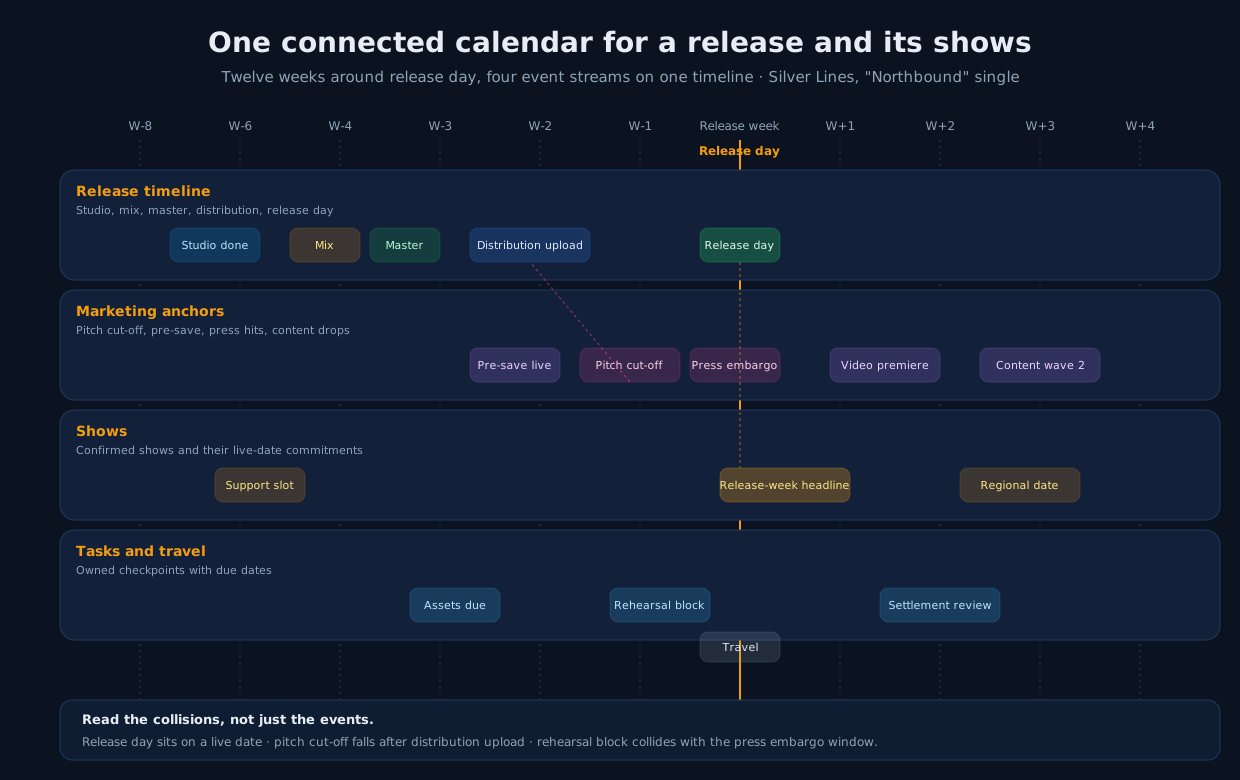
Download the diagram: connected-release-and-show-calendar.svg. Pin it above the desk or drop it into your workspace as a shared reference. The value is not the specific events on it — it's the reminder that release day, a headline show, a pitch cut-off, and a rehearsal block are the same calendar reading a different way.
A worked twelve-week example — Silver Lines, "Northbound" single
Silver Lines is a fictional three-piece with an artist manager. They're releasing a single called "Northbound" on a Friday and playing a release-week headline in London plus two support dates around it. The calendar looks like this:
- W-8: Studio done. Final tracking wrapped. The manager moves the release status from writing to production and schedules the mix window.
- W-6: Mix in. Two-week mix window opens.
- W-5: Support slot (Manchester). A confirmed support date lands. Load-in and set times are in the show record; the manager sends a check-in message to the promoter.
- W-4: Master delivered. Master arrives. The distribution upload block opens.
- W-3: Distribution upload; pre-save live. The single is delivered to the distributor with a Friday release date. The pre-save link goes live the same week and is added to bio links.
- W-2: Pitch cut-off (Spotify for Artists). Editorial pitch is submitted to Spotify for Artists at least seven days before release day so followers get the song on Release Radar (Spotify for Artists). Assets due for press and content queue.
- W-1: Press embargo lifts; rehearsal block. Two-day rehearsal block for the headline. Press embargo lifts mid-week. Travel booked for the release-week show.
- Release week: Release day + release-week headline show (London). Single is live Friday. Headline show is later that week. The advancing checklist has already closed the run of show, pass list, and settlement path.
- W+1: Video premiere. Music video goes up seven days after release, creating a distinct post-release campaign moment. CD Baby's current release-strategy guide likewise recommends planning content in advance and considering a release show or tour around the campaign.
- W+2: Content wave 2; settlement review (London). Second content wave anchors the mid-cycle streaming push. The settlement from the release-week show is reconciled against the deal.
- W+3: Regional date (Bristol). Regional follow-up show, drawing on the release-week momentum.
- W+4: Cycle review. Manager closes the release and reads the calendar back — what collided, what didn't fire, what to keep for the next single.
Every line above is either a release event, a show, a task with a due date, or a manual calendar event. Grouping by event type and artist lets the manager narrow the calendar to the records relevant to the conversation.
Where release and show calendars actually collide
Five collisions come up often enough that it's worth designing them out at the calendar level rather than solving them in the last week.
- Release day lands on a live date. A headline release-week show on the same day as release day is a strong campaign move, but a support slot two hours from the venue on release day is a distraction from the launch. Look at the release day line and every confirmed show within seven days of it, and make an active choice about which shows serve the release and which compete with it.
- The pitch cut-off falls after distribution upload. The Spotify for Artists pitch has to be submitted before release day, and the platform's own documentation names a minimum of seven days (Spotify for Artists). If the distribution upload sits at W-3 and the pitch is on the same task list, it can drift past the seven-day window while the team is chasing masters. Put the pitch cut-off on the calendar as its own event and back-time the upload from it.
- Rehearsal blocks land inside press week. Interview availability can shrink when the band is in a rehearsal room. If the release-week headline needs three days of rehearsal, block them on the calendar before the press schedule fills them.
- Travel eats the release day. Van travel between a support date and release-week press is real hours the band cannot use for anything else. If the release day plan assumes availability for release-day content, put the travel on the calendar and confirm the plan against it, not against a blank Friday.
- The settlement review from a release-week show has no owner. The show ends, the artist posts the release video, and the settlement sits unreviewed for a week. Add a settlement review task to the calendar the day the show is confirmed, owned by whoever advanced the show — the advancing checklist covers that handoff in detail.
The weekly calendar sweep — fifteen minutes
Once a week, the manager opens the calendar for the next four weeks and reads it top to bottom by stream:
- Release lane: is the next production or distribution checkpoint on track?
- Marketing lane: what's the next external deadline — pitch, press, premiere — and is it owned?
- Show lane: any confirmed show in the next four weeks not fully advanced?
- Task lane: any task inside the release window without an owner or a due date?
The sweep is not a re-plan. It's a scan for gaps, and it finishes with one or two adjustments — moving a rehearsal block, adding an owner to a settlement review, pulling a content wave forward one day. The weekly manager review can begin with this pass so the meeting starts from the calendar rather than a blank agenda.
How MNGR supports this workflow, and where it stops
MNGR is built around a connected artist-management workspace where Dashboard, Artists, Releases, Calendar, Tasks, Finance, Shows, and Contacts sit as first-class areas. Its unified calendar combines release dates and timeline checkpoints, show dates, task due dates, and manual events in one month, week, or day view, with filters for artist and event type. Shows carry dates, load-in, soundcheck, and set times on the show record; tasks carry an assignee and due date and can link to a specific release or show. In practice, the release day, a headline show, a rehearsal block entered as a manual event, and a settlement-review task can appear on the same calendar. If releases and shows are managed as first-class records, the connected calendar becomes a reading of those records rather than a document to maintain.
MNGR is not a music distribution service, a royalty-accounting system, an editorial-pitching tool, a ticket-count feed, an automated tour-routing engine, or a purpose-built press-embargo manager. Distribution uploads happen in the distributor you already use; the pitch is submitted in Spotify for Artists; ticket counts sit with the ticketing provider. The calendar records the dates those systems produce and connects them to the release and show work they belong to.
This article is a planning aid, not legal, tax, accounting, or contract advice. Follow the signed contract, platform terms, and qualified advisers where those issues apply.
Sources: Spotify for Artists, "Pitching music and videos to Spotify playlist editors"; CD Baby DIY Musician, "The ultimate music release strategy"; Tour Manager Info, "How to Properly Advance a Show or Tour". Reviewed and current as of July 2026.
Sources
Continue the workflow

Show Settlement Checklist: Deposits, Guarantees, Expenses, and Final Payout
A copyable show settlement checklist covering deposits, guarantee-versus-percentage math, expense deductions, and final payout, with a worked fictional example.
Read article
How to Advance a Show: A Pre-Show Checklist for Artists and Managers
A copyable pre-show advancing checklist from contract signing through settlement, separated by deal terms, logistics, production, hospitality, payment, and final checks.
Read article
How to Track Music Income and Expenses by Release, Show, and Revenue Source
A practical taxonomy and monthly example for logging music income and expenses by artist, release, show, and source — plus a free tracking template.
Read article