
Systems And Software
Artist Management Spreadsheet vs Dedicated Software: When to Make the Switch
A neutral decision matrix for artist managers comparing spreadsheets with MNGR across setup, linked records, permissions, cost, and migration effort.

The switch is worth considering when the same roster information has to be copied across tabs, calendars, and messages to stay current, when more than one person needs a reliable answer to "what's the status," or when a missed action would cost more than the tool used to prevent it. It is not worth making just because spreadsheets have a reputation for being unsophisticated — they aren't. Dedicated products differ, so the matrix below uses MNGR as the concrete software option rather than pretending every product works the same way.
Who this is for
This is for an artist manager or a self-managed artist who already runs releases, shows, contacts, and money through a spreadsheet — or a shared set of them — and wants an honest answer about whether that setup is still the right one. It assumes your current sheet works well enough to be in daily use; the question isn't whether spreadsheets are bad, it's whether your specific roster has outgrown what one still does well.
What a spreadsheet still does well
Spreadsheets earn their place with real, current capabilities, not just habit. In Google Sheets, you can share a file with Editor, Commenter, or Viewer access, protect sheets or ranges, and name and restore earlier versions. Those are meaningful collaboration controls, and they should count in the decision rather than being dismissed as "just a spreadsheet."
That combination is genuinely enough for a specific, common situation: one person managing a small, stable amount of information, doing mostly calculations and lists, where the current sheet is reliable and nobody downstream is duplicating or reconciling the same numbers somewhere else. If that's your roster today, the honest answer is to keep using it — a subscription doesn't fix a problem you don't have.
Where spreadsheets start to cost you
The same flexibility that makes a spreadsheet fast to start also leaves its quality controls up to the person who designed it. Raymond Panko's review of spreadsheet-error research concludes that spreadsheet errors are common and non-trivial, while also warning that many easy-sounding fixes have not been shown to work. The useful takeaway is not that every workbook is unreliable; it is that a growing operational sheet needs deliberate review, ownership, and testing.
None of this means the spreadsheet is broken. The practical strain begins when the workflow depends on relationships between records. A release date, a task, a contact follow-up, and a payment are separate facts about the same artist. A spreadsheet can connect them with formulas, lookups, scripts, and conventions, but somebody has to design and maintain those connections. The comparison is therefore between maintaining that operating model yourself and using a product where the record types and relationships already exist.
The decision matrix
Download the decision matrix diagram or use the table below across the eleven dimensions that actually change the answer.
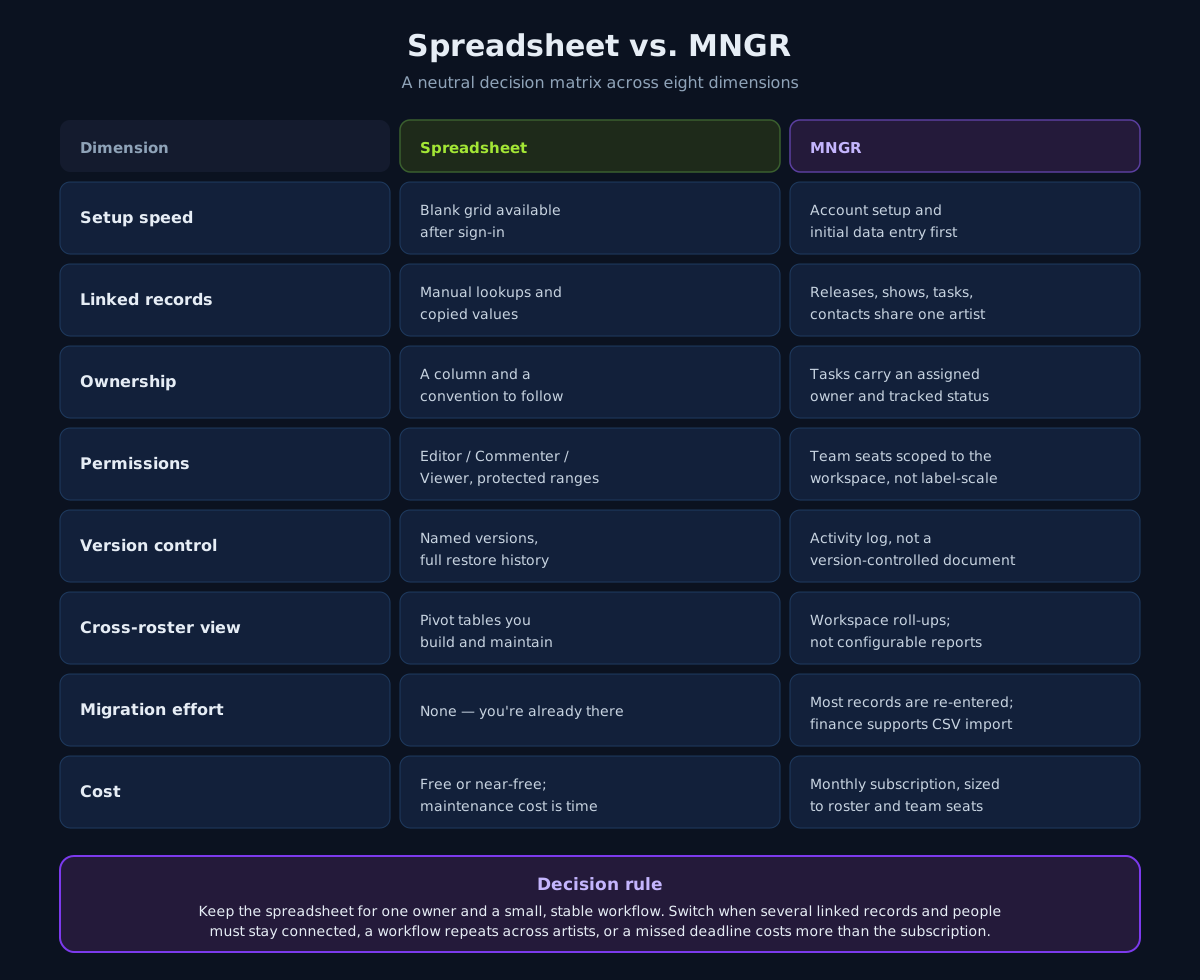
| Dimension | Spreadsheet | MNGR as the dedicated option |
|---|---|---|
| Setup speed | A blank grid is immediately available once you have a spreadsheet account | Requires workspace setup and initial data entry before it is useful |
| Customization | Any layout, column, or formula you want | Fixed record types built around releases, shows, tasks, contacts, and finance |
| Single- vs multi-artist use | Comfortable for one artist; each additional artist usually means new tabs or files | Built to hold several artist profiles without duplicating the underlying structure |
| Ownership and accountability | Ownership lives in a column and a convention everyone has to follow | Tasks carry an assigned owner and a status the system tracks |
| Linked records | Manual — a formula, a lookup, or a copied value you maintain yourself | Releases, shows, tasks, contacts, and finance entries can reference the same artist directly |
| Reminders and recurring workflows | Possible with add-ons or a separate calendar you keep in sync by hand | Dates from releases, shows, and tasks surface in one calendar view |
| Permissions and collaboration | File- and range-level: Editor, Commenter, Viewer, and protected ranges | Team seats scoped to the workspace; not a substitute for granular, label-scale permissions |
| Version control and auditability | Named versions and full version history, viewable and restorable | An activity log records actions, but this is not a version-controlled document |
| Reporting and cross-roster visibility | Pivot tables and charts you build and maintain per sheet | Workspace dashboard and task views roll up supported records across artists; this is not a configurable reporting suite |
| Migration effort | None — you're already there | Real: most existing roster records must be re-entered; only finance records currently have a CSV import path |
| Cost and maintenance burden | Free or near-free; maintenance cost is your time | A monthly subscription, sized to roster count and team seats |
Two rows are worth reading carefully before you decide. "Permissions and collaboration" and "version control and auditability" are not clean wins for MNGR — a spreadsheet's protected ranges and restorable version history are real, useful controls. Do not switch expecting a bigger system to provide fine-grained permissions or document-style version history by default; verify those requirements before treating them as a reason to move.
The decision rule
Keep the spreadsheet when one person runs a small, stable workflow and it isn't causing duplicate entry or missed actions — that's not a workflow under strain, and adding a subscription won't make it lighter.
Consider dedicated software when any of the following is true: several records and people need to stay connected without manual reconciliation, the same multi-step workflow repeats across more than one artist, or a missed deadline — a lapsed pitch window, an unpaid deposit, a distributor cutoff — would cost more than the subscription.
Roster size alone isn't the trigger. A manager running two artists with heavy show schedules can outgrow a spreadsheet faster than someone running five artists with light, predictable release cadences. Weigh the workflow, not just the headcount.
A migration checklist, if you decide to switch
- Inventory what you actually have. List every sheet or tab currently in use — release trackers, show calendars, contact lists, budgets — and note which one is the real source of truth for each.
- Map your columns to record types. Most spreadsheet columns fall into artist, release, show, task, contact, or finance categories. Write that mapping down before you touch the new tool.
- Pick one artist to migrate first. Move one artist's full set of records over and run it for a real cycle — a release, a show, a billing period — before migrating the rest of the roster.
- Run both systems in parallel briefly. Keep the old spreadsheet read-only and available during the first cycle so nothing gets lost if a record type didn't map cleanly.
- Retire the spreadsheet deliberately. Once the parallel cycle confirms nothing is missing, archive the sheet rather than deleting it, and make the new tool the only place the team updates going forward.
Common failure modes when switching
- Migrating everything on day one. A full-roster cutover with no parallel run is where records go missing and trust in the new tool erodes fastest.
- No agreed source of truth during the transition. If half the team updates the old sheet and half updates the new tool, you now have two sources of drift instead of one.
- Treating the new tool as a spreadsheet with better colors. The value is in linked records and assigned ownership, not in recreating your old tab layout inside a new interface.
- Switching without checking permission scope. Confirm what your plan's team seats actually allow before assuming it replicates a spreadsheet's range-level protection or a bigger system's approval workflow.
How MNGR fits
MNGR's current pricing lists up to five artist profiles and three team seats on Manager, and up to twenty artist profiles with unlimited team seats on Label. Both have a free trial with no card required upfront. Releases, shows, tasks, contact relationships, and finance entries can connect back to an artist; release, show, and task dates appear in the shared calendar; and the task view shows status, priority, artist, and owner across the workspace. MNGR also has a recent-activity feed for supported changes, but it is not document version history.
MNGR is not yet a label-scale system for approvals, granular permissions, private views, asset versioning, or configurable cross-roster reporting. Most roster records also need to be entered manually during migration; CSV import currently applies to finance data, not the entire workspace. If your team needs bulk migration, fine-grained access control, or a formal approval chain, verify those requirements before switching. For a manager or self-managed artist past the single-owner, stable-workflow point described above, MNGR's advantage is the connected structure you would otherwise have to build and maintain yourself.
Run your current roster through the eleven-dimension matrix above before deciding — the honest answer is specific to your workflow, not a rule about spreadsheets in general.
Sources
Continue the workflow

Music Industry CRM vs Spreadsheet vs General CRM: Which Setup Fits Your Team?
A neutral decision matrix comparing spreadsheets, general CRMs like HubSpot and Pipedrive, and a music-specific CRM across contact volume, team size, and workflow fit.
Read article
A Weekly Artist Management Meeting Agenda That Keeps Work Moving
A copyable 30-minute weekly meeting agenda for artist managers, built around decisions, owners, due dates, and exceptions across releases, shows, and finance.
Read article
How Artist Managers Organize Multiple Artists Without Missing Deadlines
A portfolio view, standard stages, one owner and approver per deliverable, and a weekly exception review keep a growing artist roster on schedule.
Read article